
Download German (United States) Keyboard – German keyboard, US keyboard, German layout, keyboard layout, typing tool, language tool, productivity tool, language learning, German typing, keyboard utility
Overview
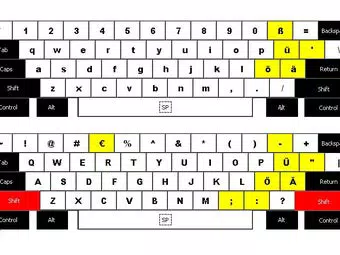
The German (United States) Keyboard is a specialized typing tool designed to bridge the gap between German language input and the standard US keyboard layout. It enables users to type in German with greater ease by adapting the familiar US keyboard format to include essential German characters such as ä, ö, ü, and ß. This layout is particularly useful for individuals who need to write in German but are accustomed to the physical arrangement of a US keyboard, avoiding the complexity of alternative input methods like dead keys or multi-key sequences.
Target users include language learners, students studying German, professionals working with German content, and travelers communicating in German-speaking regions. The tool supports efficient and accurate text entry in German, making it a practical addition to any productivity workflow. It is especially beneficial in academic, business, and personal contexts where multilingual typing is required.
The developer did not provide additional background information. The package includes the source document de-us.klc, which suggests a focus on transparency and user customization. Although the tool was released in 2009, it remains relevant for users seeking a lightweight, free solution for German language input. Its continued use underscores its reliability and practicality within the broader ecosystem of language and productivity utilities.
Key Features & Functionality
- Simplified Character Input: The layout allows direct access to German-specific characters without requiring complex keystroke combinations, reducing typing errors and increasing efficiency.
- Familiar US Layout: Characters z, y, Z, and Y remain in their standard US positions, ensuring minimal learning curve for users transitioning from a US keyboard.
- Comprehensive Mapping: The keyboard follows standard German keyboard mapping for most keys, aligning with traditional German typing habits while preserving US key placement for consistency.
- Easy Installation: The inclusion of the
de-us.klcsource file enables straightforward setup on compatible systems, allowing users to configure the layout without technical barriers. - Versatile Use Cases: Ideal for language learners, professionals, and travelers, this tool enhances communication and content creation in German across various environments.
For example, a student writing a German essay can type umlauts and the sharp s directly from standard key positions, eliminating the need to switch input methods or memorize shortcuts. Similarly, a business professional drafting an email to a German client can maintain typing speed while ensuring correct character usage. The layout supports seamless integration into daily workflows, whether on a desktop or laptop, and is optimized for consistent performance across different applications.
Interface, UX & Performance
The German (United States) Keyboard does not have a dedicated graphical interface, as it functions as a system-level keyboard layout. Users interact with it through the operating system’s language and keyboard settings. The design philosophy prioritizes functionality over visual flair, focusing on usability and efficiency.
Navigating the layout is intuitive for users familiar with the US keyboard. The placement of German characters follows predictable patterns based on standard German keyboard conventions, which enhances the learning curve. Although the developer did not list formal performance metrics, the tool’s lightweight nature—1.5 MB in size—suggests minimal system impact. It is expected to operate smoothly on most modern Windows systems without causing lag or instability.
Responsiveness is likely consistent with native keyboard input, as the layout is implemented at the system level. Stability is implied by its long-standing availability since 2009, indicating a mature and reliable design. However, specific compatibility details with newer Windows versions were not disclosed.
Platform Compatibility & Technical Requirements
The German (United States) Keyboard is designed for the Windows platform and requires a compatible version of the Windows operating system. The software version is 1.0, and the file size is 1.5 MB. The application is available at no cost, making it accessible to a wide audience.
The developer did not specify minimum OS requirements or compatibility with specific Windows versions. While the tool was released in 2009, it may still function on current Windows systems due to its lightweight, system-level integration. However, users should verify compatibility with their specific version of Windows before installation. No additional hardware or software dependencies were listed.
Pros and Cons
Pros
- Free to download and use, making it accessible for all users.
- Simple and intuitive layout that preserves the US keyboard structure.
- Efficient input of German characters without complex keystrokes.
- Includes source file for easy installation and potential customization.
- Lightweight size (1.5 MB) ensures minimal system resource usage.
Cons
- Not available for mobile platforms; limited to Windows systems.
- Developer background and support details were not provided.
- Compatibility with newer Windows versions was not confirmed.
- Limited to desktop use; no mobile or tablet support.
- No official update history or release notes were shared.
FAQ
Is the German (United States) Keyboard free to use?
Yes, the tool is available at no cost. It does not require payment or subscription for installation or ongoing use.
Can I use this keyboard layout on my mobile device?
No, the German (United States) Keyboard is designed exclusively for Windows desktop and laptop systems. It is not available for Android or iOS devices.
How do I install the keyboard layout?
Installation is straightforward. The package includes the de-us.klc source file, which can be imported through the Windows keyboard settings to enable the layout.
Is the keyboard layout compatible with Windows 11?
While the developer did not confirm compatibility, the tool’s lightweight design and system-level integration suggest it may function on Windows 11. Users are advised to test it on their system.
Does this keyboard require internet access?
No, the keyboard layout operates offline. Once installed, it does not require an internet connection to function.
Final Thoughts
The German (United States) Keyboard stands out as a practical, no-frills solution for anyone needing to type in German on a US keyboard. Its thoughtful design balances familiarity with functionality, allowing users to maintain typing speed while accurately inputting German-specific characters. The inclusion of the source file enhances transparency and supports user-driven setup, making it a reliable choice for students, professionals, and language enthusiasts.
Despite its age, the tool remains relevant due to its simplicity, low resource usage, and free availability. While it lacks modern features like mobile support or official updates, its core purpose is fulfilled with precision. For users seeking a straightforward way to enhance their German typing experience on Windows, this keyboard layout delivers real value.
Download German (United States) Keyboard now


